Up to 8× frames displayed.
Without buying a GPU.
AI frame generation on your dormant iGPU: up to 8× frames displayed (game render rate unchanged). Impact < 10% on your graphics card.
One build for everyone. Free during the beta — no account, no sign-up, instant download.
REAL RESULTS
Real gameplay. Real numbers.
Cyberpunk 2077 • Ultra + Ray Tracing
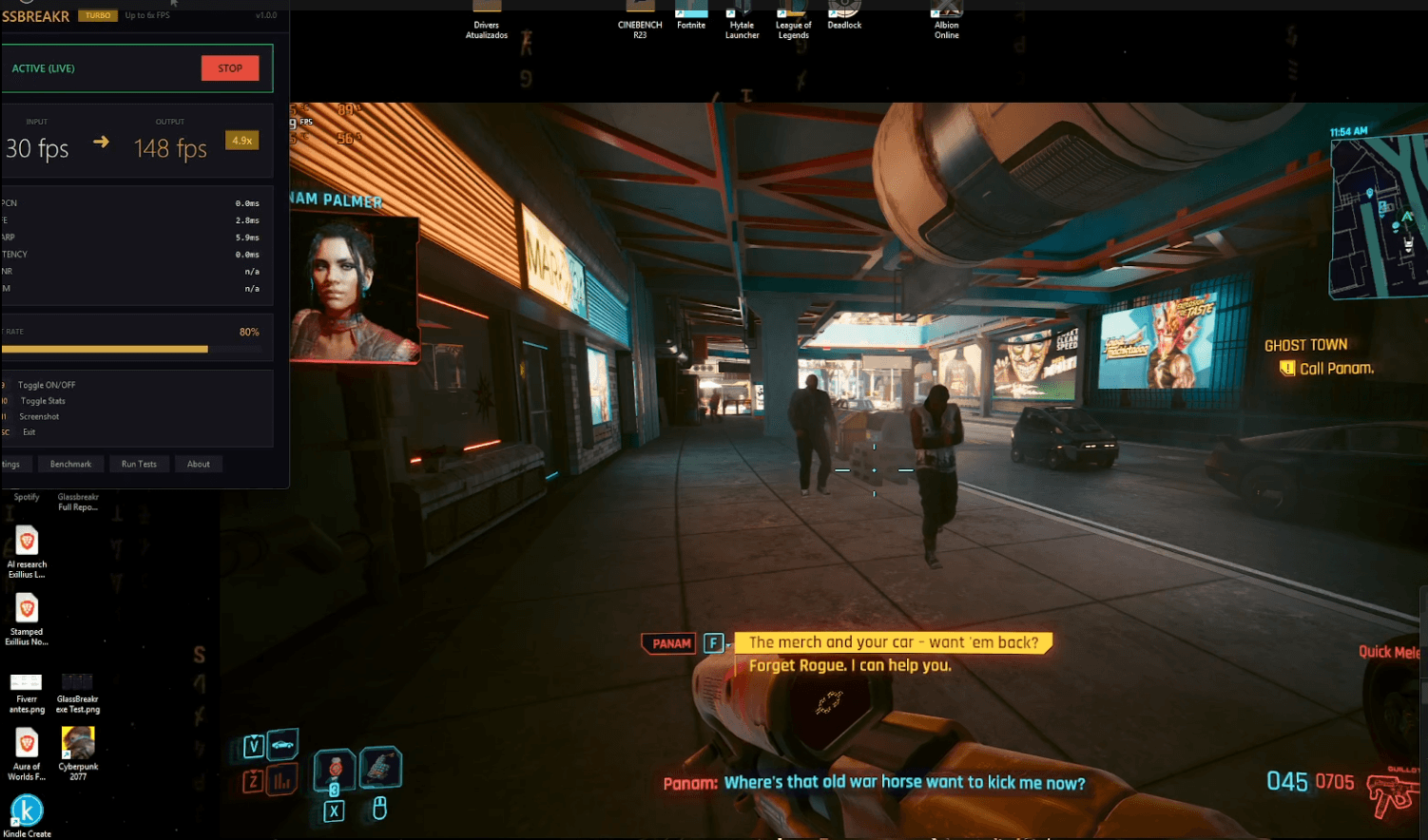
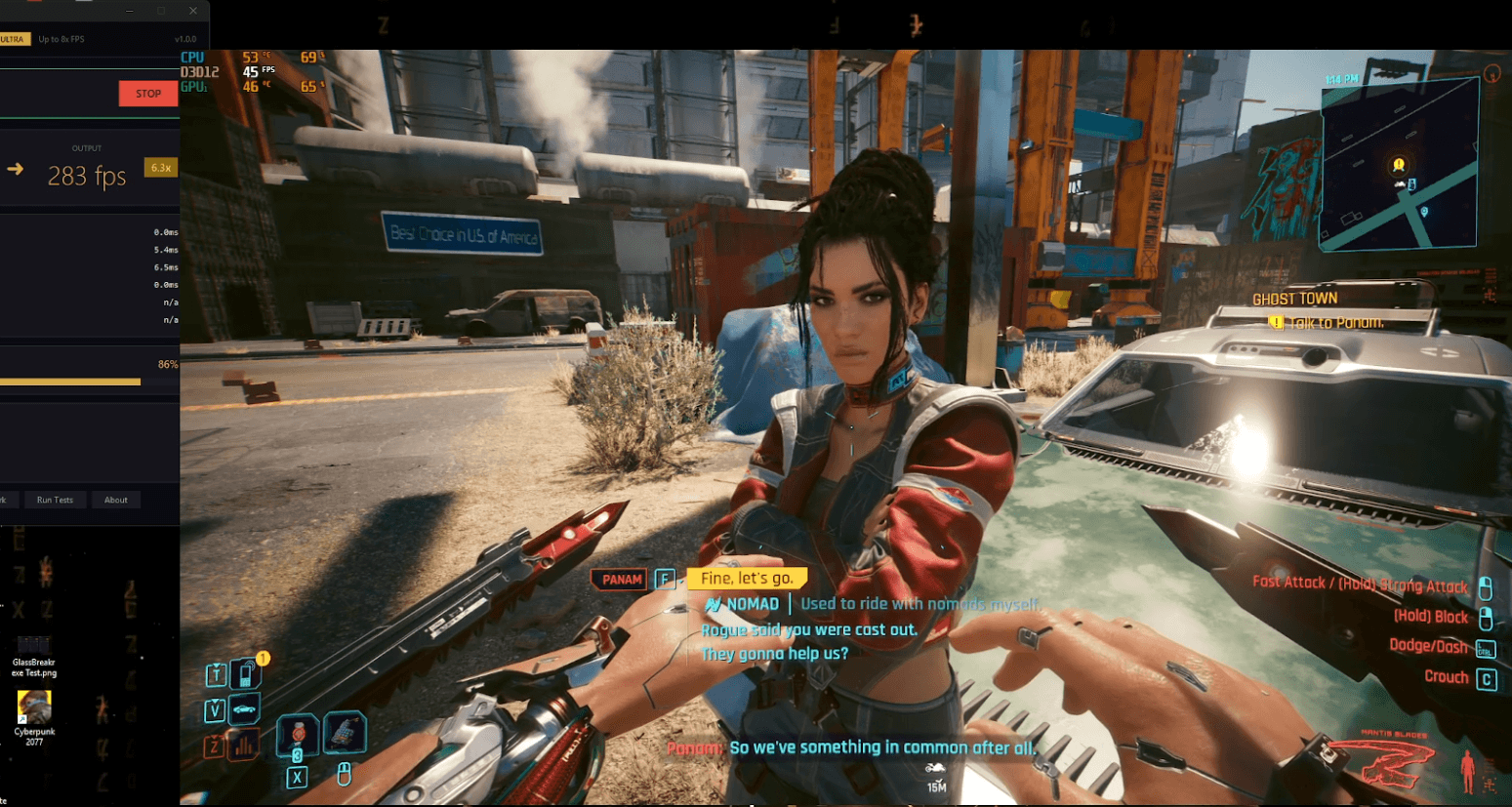
These are real in-game captures. “Output FPS” is what GlassBreakr generates (captured + AI-interpolated frames) versus the game's render FPS — how many you actually see depends on your monitor's refresh rate (a 180Hz display shows up to ~4×, a 240Hz+ display more).
Cyberpunk 2077 is a trademark of CD Projekt RED.
TOTAL TRANSPARENCY
The 3 “FPS” — and why they differ
Frame generation smooths what you see — it does not make the game itself faster. Here is exactly what each number means. Measured, not rounded up.
≈ 2×
30 → 63 fps
Real frames — responsiveness
The game is not faster. Real frames reach about 2× at best, and your input stays tied to this number.
8×
45 → 283 fps
Displayed FPS (output) — smoothness
1 captured frame + AI-generated frames, up to 8×. Real Cyberpunk runs measured 6.3× (ULTRA) and 4.9× (TURBO).
≈ 4×
~180 fps · 180 Hz
Visible FPS — capped by your screen
A 180 Hz monitor shows ULTRA at ~180 fps (≈ 4× visible). A faster display shows more.
+15–25ms
≈ 1 frame
Added latency
Frame-gen adds about one frame of latency, and input is still sampled at your rendered FPS. Not for competitive esports.
Same approach as NVIDIA DLSS Frame Generation and Lossless Scaling. The AI runs on your idle integrated GPU — measured dedicated-GPU impact 0–9.6%. Measured on HP OMEN: Ryzen 7 8845HS + RTX 4070 Laptop + Radeon 780M iGPU.
Image quality of generated frames, measured (PSNR/SSIM, 2026-07-03): at 8×, every generated position beats frame duplication (median SSIM 0.674 vs 0.42); sharpness is capped by the internal 320×192 pipeline and the worst 5% of frames degrade visibly — full proof: zmlabs-ai/benchmarks.
HOW IT WORKS
3 steps. 60 seconds.
Download
Grab GlassBreakr. One .exe, no install, no dependencies.
Launch your game
Play any game. GlassBreakr captures your screen automatically.
Press F9
Activate frame generation. Watch your FPS multiply instantly.
Your iGPU is sleeping. Wake it up.
GlassBreakr uses your integrated GPU — the one doing nothing while you play — to generate intermediate frames using AI.
Result: up to 8× frames displayed (game render rate unchanged). Impact < 10% on your graphics card.
Up to 8x
Frames displayed (game render rate unchanged)
< 10%
dGPU Impact
~15–25ms
Added Latency
REAL BENCHMARKS
Measured. Not calculated.
| Frame multiplier | Up to 8× |
| Load on your gaming GPU | < 10% |
| Frame pacing | ~95% |
| Added latency | ~15–25 ms |
| AI engine | RIFE-Nano |
| Platforms | Windows |
Measured on real gameplay. The engine generates up to 8× frames — how many you actually see depends on your monitor: a 180Hz display shows up to ~4×, a 240Hz+ display more. Your gaming GPU stays free to render — that's the point. GlassBreakr runs on Windows.
Reproducible proofs on GitHub →Choose your plan.
ULTRA
Experimental
- AI frame generation
- Up to 8× frames displayed (game render rate unchanged)
- Unlimited sessions
- No watermark
- Scene change detection
- Adaptive timestep
One build, the best one, free while in beta. Paid plans will come later.
Frequently asked questions.
All games. GlassBreakr captures the screen and injects frames. Tested on Minecraft, GTA V, Hollow Knight, Rocket League and more.
DLSS/FSR use your dedicated GPU. GlassBreakr uses your iGPU (Intel/AMD integrated) which does NOTHING while you game. Less than 10% impact on your graphics card.
~15–25ms of added latency. Not recommended for competitive esports (CS2, Valorant ranked).
The in-game overlay runs on Windows 10/11 only. GlassBreakr Video 1.1.0 (offline frame interpolation for video files) runs on Windows, macOS (Apple Silicon and Intel, signed and notarized) and Linux: see the Download page.
During the beta, ULTRA is free for everyone — there is nothing to cancel. If paid plans arrive later, they will be month-to-month with no commitment, cancel anytime.
Yes. During the beta we distribute a single build — ULTRA, our best engine — free for everyone: next-gen multi-frame interpolation (up to 8× frames displayed, game render rate unchanged), scene-change detection, adaptive timestep, unlimited sessions, no watermark. Paid plans may come later.
GlassBreakr works differently from DLSS/FSR. It captures your screen, generates interpolated frames via AI, and displays them on a separate overlay window. MSI Afterburner measures your game’s render FPS, which stays the same. The extra frames are displayed on GlassBreakr’s overlay on top of the game. The “Output FPS” shown in the app is the real number of frames displayed per second (captured + AI-generated). This is frame interpolation, not game-level frame generation.
Ready to multiply your FPS?
Download GlassBreakr: up to 8× frames displayed (game render rate unchanged). Free for everyone during the beta.